...

Email Marketing for Beginners: The 5 Fundamentals You Need Before Sending a Single Email

Master the five pillars of email marketing for beginners - deliverability, copy, design, segmentation, and strategy - before you send your first campaign.

If you’re just getting started with email marketing for beginners, the first thing you need to know is this: it’s not as simple as sending a newsletter and watching sales roll in.

Email marketing is part art, part engineering. You’re not sending a message to your grandma—you’re fighting for space in one of the most competitive inboxes on the planet.

And yet, when done right, it can become the most reliable source of revenue in your business.

In this guide, we’ll walk through the five fundamentals you must understand before you send your first email:

  1. Deliverability
  2. Copywriting
  3. Design
  4. Segmentation
  5. Strategy

The 3 Myths Every Beginner Should Ignore

Before we dive in, let’s clear up a few misconceptions that have misled countless founders:

  1. “Email is easy.”
    No, it’s not. It takes time to manage, test, and refine. Good email marketing is built on systems, not spontaneity.
  2. “Email doesn’t work anymore.”
    Wrong again. It’s more effective than ever—but only for brands that put in the work to nurture their list.
  3. “Email generates a 42:1 ROI.”
    That famous stat is overblown. Realistically, if you’re doing it right, you’ll see healthy returns, but not magic. Email scales profit from what already works; it doesn’t create success from nothing.

Think of it like “passive income.” You can’t have passive income without first creating active income. The same goes for email—you need a functioning business before it becomes a profit engine.

1. Deliverability — The Invisible Foundation

Deliverability is about as interesting as watching paint dry. It’s also the layer that decides whether anyone ever sees your emails. If it fails, design, copy, and automation don’t matter.

Inbox providers evaluate each sender on identity, consistency, and user response. Treat deliverability as your operating license: earn it, protect it, and scale it carefully.

Step 1: Authenticate Your Domain

In Klaviyo, connect your sending domain and add SPF, DKIM, and DMARC at your domain host (under Domains in Klaviyo). These records prove you are the legitimate sender and prevent impersonation. Skipping this step invites filtering and sporadic inboxing.

Simple frame: authentication is your verified ID at the door. Unverified senders wait outside.

Step 2: Warm Up Gradually

Avoid day-one full-list blasts. Start with a small, engaged segment and increase volume in measured steps as engagement holds. Positive opens, clicks, and replies strengthen reputation. Sudden spikes in volume or frequency do the opposite.

Step 3: Maintain List Health

Treat the list like a living system. Suppress or sunset profiles that haven’t opened or clicked in 30–60 days (use a short re-engagement sequence first). Prioritize consented contacts only. Engagement rate is more valuable than raw list size.

Step 4: Reduce Spam Triggers

Keep signals clean:

  • Moderate punctuation and caps in subject lines.
  • Balance images and text; avoid heavy, image-only emails.
  • Write honest preview text that matches the email.
  • Steer clear of trigger language like “guaranteed,” “act fast,” “risk-free.”
  • Keep cadence predictable.

Natural, straightforward language travels further than hype.

Step 5: Test and Track

Deliverability is ongoing work. Monitor:

  • Open rate (early indicator of placement shifts)
  • Bounce rate (target < 2%)
  • Spam complaints (target < 0.1%)

If metrics slip, pause scale-up and review recent changes—subject lines, segments, imports, sending frequency, or creative. Adjust, then resume.

Deliverability isn’t exciting, but it’s essential infrastructure. Build it once, maintain it always, and everything downstream performs better.

2. Copywriting — Where the Sale Begins

Copy is what moves a person from seeing your name in their inbox to taking action. It’s not decoration — it’s direction.

When you write an email, think of the reader’s journey as three short moments:
they notice it, they open it, they decide what to do next.
Each stage depends on clear, human language.

Step 1: Start With the Subject Line and Preview Text

These two lines decide whether your email gets opened.
A good subject line does one of three things:

  • creates curiosity (“The morning ritual that changed everything”)
  • offers value (“3 simple upgrades to your skincare routine”)
  • confirms relevance (“Your order is ready for dispatch”)


The preview text should add context, not repeat the subject.
If the subject says “Back in stock”, the preview might say “Your favorite blend just returned — while it lasts.”

Step 2: Structure the Body Clearly

Once they open, you have a few seconds to keep attention.

Use a short headline, one supporting line, and a clear next step.

Break paragraphs into one or two sentences.

Every line should help the reader understand what matters and why.

Personalization helps, but only when it feels natural.

Using their first name in the greeting is enough — don’t scatter it everywhere.

Step 3: Write Like a Person

People read email differently from ads. Avoid filler words, clichés, and corporate phrasing.

Say “We’ve updated our formula with cleaner ingredients” instead of “Our latest product innovation optimizes performance.”

Clarity builds trust faster than style ever will.

Step 4: Keep the Message Relevant

Every email should have one clear purpose — to inform, remind, invite, or sell.

Don’t blur them together.

If you’re writing a reminder, make it specific:

Instead of “Still thinking about it?”, say “We saved your favorites for you — they’re waiting in your cart.”

Relevance makes the email feel like it belongs in their inbox.

Step 5: Refine One Element at a Time

Once you have a structure, test it gradually.

Change a single element — the subject line, the headline, or the call to action — and watch how engagement shifts.

Testing too many variables at once hides what’s working.

Over time, these small refinements reveal how your audience actually thinks and responds.

Good copy feels effortless to read.

When it sounds like a person sharing something useful — not a company broadcasting noise — your readers stop scrolling and start clicking.

3. Design — Make It Flow

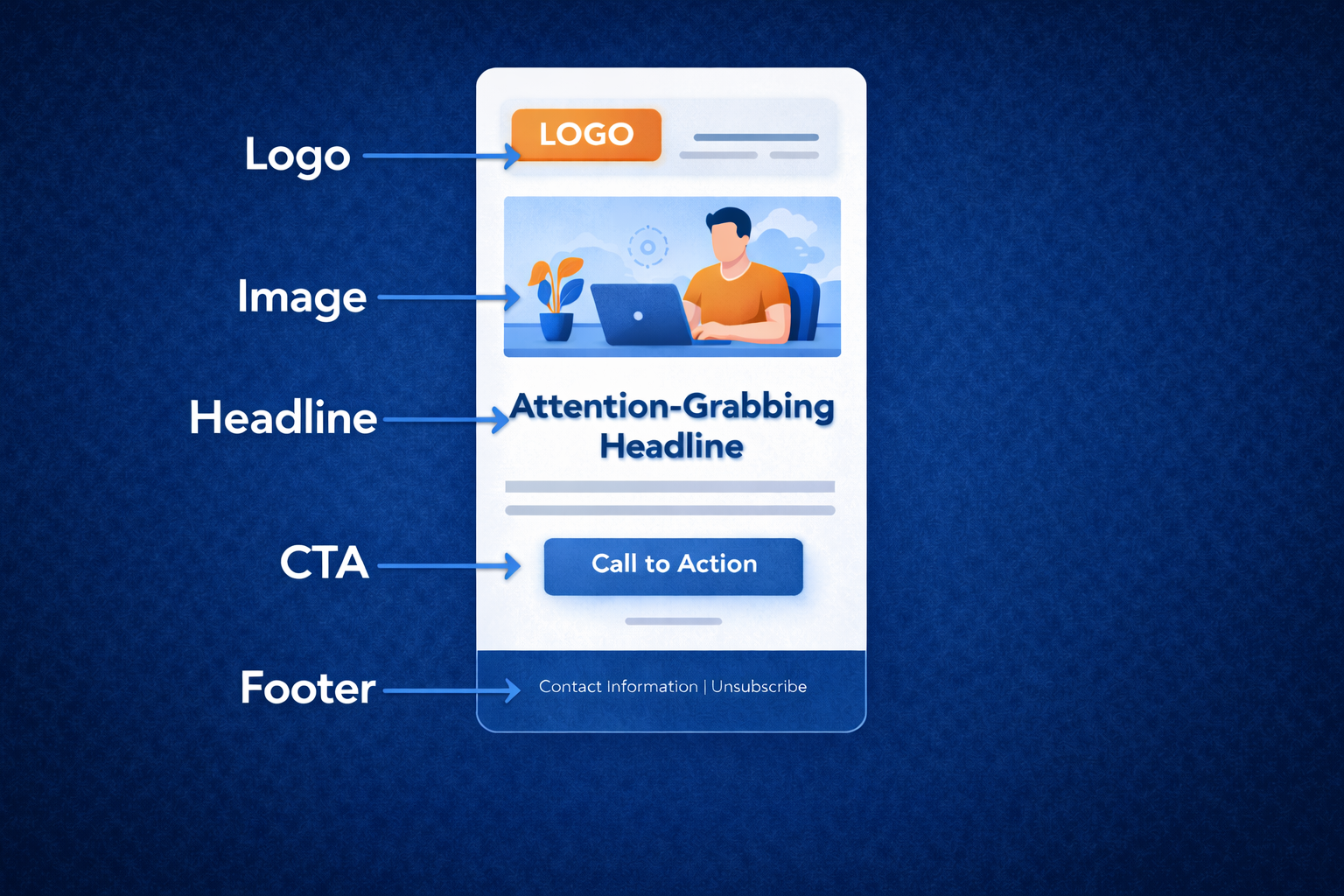
Email layout design

Design exists to make reading easy. Besides looking good, it’s job is to guide attention from start to finish without friction.

A well-structured email should feel calm and deliberate. Every element — the header, image, text, and button — should have a reason to be there.

Step 1: Start with a Clear Structure

Build from the top down:

  • Header: logo and navigation (if relevant)
  • Hero image or headline: the main focus of the message, with a CTA above the fold.
  • Body: short text that explains the key point
  • Call to action: a single, visible button that says what to do next
  • Footer: contact details, socials, and unsubscribe link


This simple hierarchy creates flow. The reader’s eye should move naturally toward the action you want them to take.

Step 2: Keep the File Light

Large images slow loading and trigger clipping in Gmail.

Keep total email size under 100kb — ideally less. Compress images and use web-safe fonts.

If you rely heavily on visuals, balance them with text so spam filters can read the content.

Step 3: Use Contrast and Space

Contrast draws attention to what matters.

If your background is light, use a bold color for your CTA button.

Give each section breathing room — white space makes the message easier to digest.

Avoid crowding multiple offers or visuals in one frame. One focus per email is enough.

Step 4: Design for Readability

Most people read on mobile, so test layouts in mobile view first.

Keep lines short, buttons large enough to tap easily, and text at a comfortable size (14–16px minimum).

Place your main CTA near the top, then repeat it at the bottom if the email is long.

Step 5: Stay Consistent

Your emails are part of your brand system.

Use the same fonts, colors, and tone across every campaign so readers recognize you instantly.

If you want more creative control, build your template in Figma. It allows you to refine spacing, layout, and color balance before importing to Klaviyo. Klaviyo’s editor works fine for speed, but Figma helps you build a library that scales.

When your layout feels easy to read and pleasant to look at, people stay longer, click more, and trust the message behind the visuals.
4. Segmentation — The Secret Weapon of Email

Segmentation is how you make email feel personal at scale. It ensures that every message lands with context — the right person, at the right time, for the right reason.

When you segment well, your emails stop feeling like broadcasts and start feeling like conversations.

Step 1: Begin with Simple Groups

Start with two core segments:

  • Customers — people who’ve purchased from you
  • Non-customers — subscribers who haven’t yet

This basic split allows you to adjust tone and goals immediately. Customers might receive education, cross-sells, or early access. Non-customers might receive social proof, reviews, or introductory offers.

Step 2: Layer in Behavior

Once you’ve mastered the basics, build segments based on actions:

  • Viewed Product A, didn’t buy
  • Bought Product A, hasn’t tried Product B
  • Added to cart but didn’t checkout
  • Opened last 5 emails but never clicked

Behavior-based segments help you speak directly to what a person is already doing. It’s the difference between talking at someone and talking with them.

Step 3: Protect Deliverability

Not everyone on your list should receive every email. Exclude inactive subscribers (those who haven’t opened or clicked in 60–90 days) to keep engagement metrics strong.

A smaller, more active list builds a better reputation with inbox providers — which helps every future send land more consistently.

Step 4: Personalize With Purpose

Segmentation isn’t about inserting names into subject lines; it’s about sending messages that feel intentional.

A loyal customer doesn’t need the same message as someone discovering your brand for the first time.

Tailor the offer, tone, and timing — not just the name.

Step 5: Track and Adjust

Your best segments will change over time. Monitor engagement trends and product cycles to see which groups respond best. If a segment stops performing, refine its conditions or pause it.

Segmentation is never “done.” It evolves as your audience does.

Strong segmentation improves conversions, deliverability, and customer experience all at once. It’s the most reliable way to make sure your emails stay relevant — and that your readers stay interested.

📬 Want practical segment examples for your own brand?

Join our mailing list to receive our upcoming Segmentation Guide for eCommerce, including exclusion segments for who NOT to send to with your emails.

(Sign up link placeholder — e.g. shawfiremedia.com/segments-guide)

5. Strategy — Know Why You’re Sending

Email Marketing for Beginners

Email strategy is about rhythm and intent.
It’s knowing why each message exists before you write it.
When every send has a defined purpose, your audience learns what to expect — and starts trusting that what lands in their inbox is worth opening.

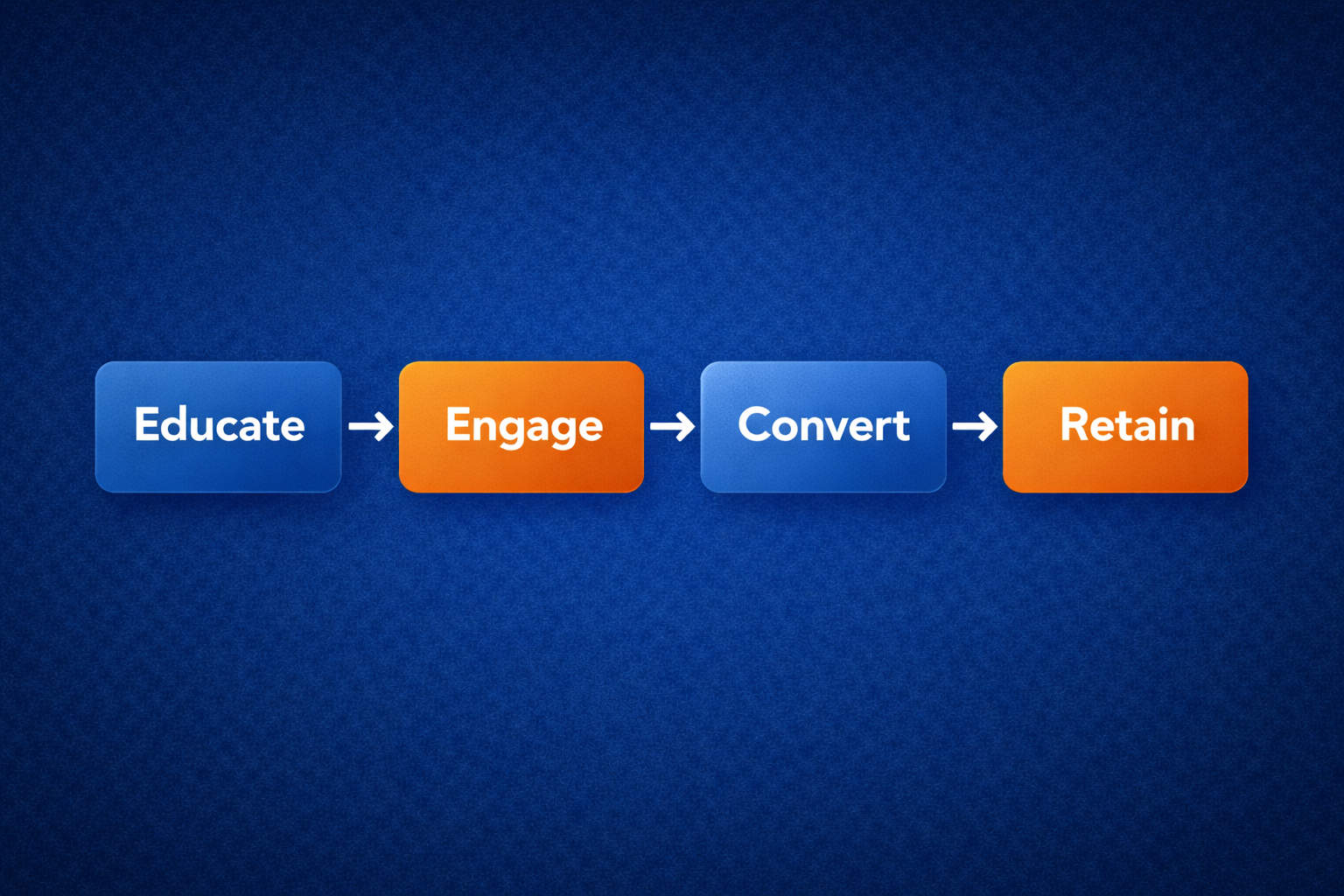
Step 1: Define the Purpose

Each email should do one thing well.
That purpose might be:

  • Educate — teach something useful or clarify product benefits
  • Engage — share a story, survey, or conversation starter
  • Convert — highlight an offer or drive a direct purchase
  • Retain — thank customers, celebrate milestones, or encourage repeat use

Knowing the intent prevents mixed signals. A single clear purpose is stronger than three competing ones.

Step 2: Build Around the Customer’s Journey

Map your communication to where someone is in their lifecycle.
New subscribers need understanding; returning customers need reassurance.
For example:

  • Welcome flows introduce who you are and what you stand for.
  • Post-purchase flows show customers how to get the best experience from what they’ve bought.
  • Win-back flows remind past buyers why they trusted you once — without pushing too hard.


This sequencing turns your emails into a natural extension of the brand experience.

Step 3: Balance Value and Sales

Every brand wants revenue from email, but pressure alone doesn’t build loyalty.

A healthy email strategy includes educational, community, and storytelling content alongside promotions.

When people see consistent value without constant selling, they start reading by choice, instead of looking for discounts.

You earn the right to sell through trust. That trust is built with balance.

Step 4: Keep a Consistent Cadence

Email works best when it’s predictable.

Whether you send once a week or twice a month, consistency matters more than frequency.

It shows stability and helps your audience know when to expect you.

Avoid long silences followed by bursts of campaigns. Engagement is strongest when communication feels steady.

Step 5: Review and Adjust

Every month, review campaign performance alongside business goals.

Look beyond revenue — consider open rates, click rates, and replies as signals of interest.

When something performs well, understand why it worked before replicating it.

Strategy improves through iteration, not overhaul.

A well-built strategy makes every send purposeful and sustainable.

You stop chasing one-off wins and start compounding trust, engagement, and sales over time.

Email Marketing for Beginners - key things to remember

  • Email isn’t easy—but it’s worth mastering. Start with structure, not tactics.
  • Focus on the five fundamentals: deliverability, copy, design, segmentation, strategy.
  • Treat your subscribers like people, not data. Segment and personalize.
  • Mix your content. Teach, inspire, sell—don’t just discount.
  • Trust builds profit. When you communicate with intention, revenue follows naturally.

Once you understand these pillars, you’re ready for the next step: applying them inside Klaviyo.

For more insights, join up to the Shawfire email list below.

Get Started with Expert Email Strategy Today

Work with experts who drive engagement, retention, and revenue.

Schedule a free consultation and grow your eCommerce brand.
Seraphinite AcceleratorOptimized by Seraphinite Accelerator
Turns on site high speed to be attractive for people and search engines.